
HOLLA - Video Call
HOLLA GroupSocial
4.227.02K Reviews
- Version
- 9.17.0
- Installs
- 10.00M
- Age Rating
- Mature 17+
Screenshots
Our Review of HOLLA - Video Call
 Analysis by Appyee
I tried HOLLA - Video Call as a quick way to meet people through live video rather than another carefully edited social profile. It is a free social app from HOLLA Group, aimed at mature users and built around spontaneous conversations with people who share your interests. That sounds simple, but the experience depends heavily on how you approach it: opening the app with a clear purpose feels very different from treating it as an endless stream of random calls.
My first impression was that HOLLA is best understood as a casual discovery tool, not a replacement for messaging apps, work video calls, or a private community. You can use it when you want a short conversation, a new perspective, or a more immediate social experience. You should also be comfortable with the fact that live video brings uncertainty. Not every match will be interesting, and not every person will communicate in the way you expect.
The app has been available since July 12, 2016, and its current version is 9.17.0. It requires Android 8.0 or later, while the free download includes optional in-app purchases ranging from $0.49 to $99.99 per item. Its average rating is 4.2 from around 457 thousand ratings, and it has passed 10 million installs. Those figures suggest that the format has found a substantial audience, but they do not change the basic trade-off: HOLLA gives you speed and spontaneity in exchange for less control than a normal social network.
How the everyday HOLLA experience works
I find the everyday experience works best when I treat HOLLA as a quick way to start a conversation, not as a promise that every match will click. A little preparation—choosing a comfortable setting and knowing what kind of chat I’m open to—makes it easier to handle the spontaneity without sharing more than I intend.
A simple starting routine makes a difference
I recommend beginning with a small, repeatable routine instead of tapping through calls without thinking. Decide whether you are looking for a relaxed conversation, a shared-interest discussion, or simply a few minutes of social contact. That choice affects how patient you are with the first match and helps you avoid judging the whole app after one awkward exchange.
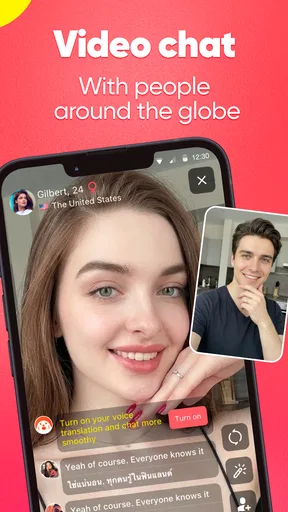
The central appeal is the video format. Seeing facial expressions and hearing someone’s tone makes a short conversation feel more immediate than text-based matching. It can also make the first few seconds more demanding. With a message, you can edit your words and wait for a reply. With live video, you need to greet someone, read the situation, and decide quickly whether the conversation is worth continuing.
In my experience, a brief opening works better than an elaborate introduction. I would say hello, mention the kind of conversation I am open to, and ask a simple question connected to the other person’s interests. If the exchange feels forced, ending it politely is more useful than staying because the app makes it easy to keep moving.
A realistic use case for short breaks
Imagine having a long break between classes or finishing work earlier than expected. You may want human interaction without arranging a call with a friend in advance. HOLLA fits that moment better than a traditional social feed because it gets you into a live exchange quickly. I would use it for a limited period, keep the conversation light at first, and leave when the interaction stops being enjoyable.
That same scenario shows the app’s weakness. A short break does not leave much room for repeated mismatches, poor connections, or conversations that become uncomfortable. If you need a predictable discussion with a known person, a standard messenger or established video-calling service is the better choice. HOLLA is strongest when uncertainty is part of the appeal, not when you need guaranteed results.
What the mature rating means for your decision
HOLLA carries a Mature 17+ content rating, so I would not treat it as a general-purpose app for children or younger teenagers. A live social environment requires personal judgment even when the conversation begins casually. Anyone using it should be prepared to end a call immediately if another person behaves disrespectfully, pressures them, or asks for information they do not want to share.
I would also avoid revealing details such as a home address, school schedule, workplace location, financial information, or private contact details during an early conversation. The video format can create a false sense of familiarity very quickly. A friendly exchange is not the same as knowing someone well.
Settings I would check before making calls
Experienced use starts before the first match. I would review the app’s available account, notification, camera, microphone, and privacy controls, then keep only the access needed for the way I intend to use it. The exact choices can vary by device and operating system, but the principle is consistent: understand what you are enabling rather than accepting every prompt automatically.
Camera and microphone access are obviously central to video chat, yet that does not mean you need to appear on camera in every situation. If you are in a public place, using a weak connection, or simply not ready to be visible, it is sensible to wait until your surroundings are suitable. A quiet room, a stable connection, and a neutral background make the conversation more comfortable for both people.
Notifications deserve attention as well. If HOLLA alerts you frequently, the interruptions can make the app feel more demanding than social. I prefer notifications that support intentional use rather than pulling me back whenever there is activity. Turning down unnecessary alerts is a small adjustment, but it helps keep the app in its proper place instead of letting it dominate the day.
Use your environment as part of the setup
A practical habit is to check the background before starting a call. Remove documents, visible addresses, distinctive personal items, or anything that reveals more about your routine than you mean to share. This is not about making the room look perfect; it is about controlling accidental information in a format where another person can observe you in real time.
Headphones can help in shared spaces, although they are not always necessary. They reduce the chance that nearby people hear the other participant and can make speech easier to follow. If you are walking, commuting, or surrounded by noise, I would postpone the call rather than trying to force a conversation through poor audio. The app’s spontaneous nature is useful, but it does not remove ordinary video-chat limitations.
Small habits that make matching less tiring
One of the most useful habits is setting a personal stopping rule. For example, I might give a conversation enough time for a greeting and one genuine question, then move on if there is no mutual interest. Without a rule like that, rapid matching can become mentally tiring because every call demands a fresh introduction.
I also find it helpful to keep a few neutral opening topics ready. Interests, travel experiences, films, food, music, and everyday routines are easier starting points than questions that feel intrusive. The goal is not to perform; it is to create a clear opening that lets both people decide whether they want to continue.
Another useful pattern is to separate discovery from connection. HOLLA is good at creating an initial encounter, but that does not mean every promising conversation should immediately move elsewhere. I would first see whether the other person respects boundaries and communicates consistently. Moving too quickly to another service can remove the limited protection and control offered by staying inside the original interaction.
How HOLLA compares with familiar alternatives
Compared with ordinary messaging apps, HOLLA is more immediate and less curated. Messaging gives you time to inspect a profile, compose a response, and build context gradually. HOLLA removes much of that preparation, which can feel refreshing if you dislike endless text exchanges. The cost is that you have fewer clues before the conversation begins.
Compared with group video communities, HOLLA feels more personal because the interaction is centered on a direct conversation rather than a room full of participants. That can make it easier to focus, but it also means a poor match affects the entire experience. Group spaces are often better for people who want a shared topic, visible moderation structure, or the ability to observe before speaking.
Compared with dating-focused platforms, HOLLA is less useful if your main goal is a carefully filtered romantic match. Its interest-based social angle is broader, and the live format favors quick interaction over detailed compatibility checks. I would choose it for meeting people casually, not as my only tool for serious relationship decisions.
Where the free model needs attention
The app is free to download and use, but optional purchases are part of the experience. I would check the purchase flow carefully before confirming anything, especially if the app presents paid items while I am trying to continue a conversation or improve the matching process. The listed range runs from $0.49 to $99.99 per item, which is wide enough that casual users should keep a clear spending limit.
My advice is to use the free experience first and decide whether the basic workflow already meets your needs. Do not assume that paying will solve the main uncertainty of live matching. A purchase may change access to something offered inside the app, but it cannot guarantee an engaging conversation, good manners, or a reliable connection.
Limits that experienced users should accept
The biggest limitation is not a missing button; it is the nature of spontaneous video. You cannot fully control who appears, how prepared they are, or whether the conversation will be balanced. Even with good settings and a clear routine, some sessions will be dull or uncomfortable. That is a structural trade-off rather than a problem that can be eliminated through practice.
Privacy is another important limit. A live call exposes more than a text message, including your appearance, voice, surroundings, and reactions. I would never use HOLLA as though it were a private conversation with a trusted friend. The app can be enjoyable while still requiring restraint about what is visible and what is disclosed.
There is also a social-energy cost. Rapidly meeting strangers can be exciting for a few minutes and exhausting after a longer session. If you notice yourself giving the same introduction repeatedly or continuing calls out of obligation, the right improvement may be taking a break rather than changing another setting.
Who should use it, and who should skip it?
I think HOLLA suits adults who are comfortable with live conversation, enjoy meeting unfamiliar people, and can handle quick decisions. It is particularly appealing if you find text-based social apps too slow or too focused on profiles. People who like practicing conversation, exchanging everyday perspectives, or filling a short free period may get genuine value from it.
I would skip it if you need strong predictability, detailed pre-screening, or a tightly controlled audience. It is also a poor fit for anyone who feels pressured by face-to-face interaction with strangers or who is unwilling to manage privacy carefully. A conventional messenger is better for known contacts, a group community is better for topic-led discussion, and a dating service is better for deliberate romantic matching.
My final way of using HOLLA
After testing the workflow, I see HOLLA works best as a controlled dose of spontaneous social contact. I would prepare my surroundings, check permissions and notifications, start with a clear conversational intention, and use a personal stopping rule. Those habits do more for the experience than trying to turn every match into a meaningful connection.
The app’s scale is reassuring for anyone who wants an active social environment: it has more than 10 million installs and a 4.2 average from roughly 457 thousand ratings. Still, popularity should not be confused with personal suitability. The right question is whether you enjoy the uncertainty of live matching and can maintain boundaries while doing it.
HOLLA - Video Call is worth trying if you want a free, mature-rated social app centered on direct video interaction and you understand its limits. I would recommend it to a friend who wants casual conversations and can leave unproductive calls without taking them personally. I would not recommend it to someone seeking a private, predictable, or carefully filtered communication tool. Used intentionally, it can make a spare moment feel more social; used without boundaries, it can quickly become tiring and intrusive.
Verdict
Strengths of HOLLA - Video Call
- Quickly connects you with people worldwide through live video calls.
- Simple interface makes starting a conversation easy for first-time users.
- Useful filters and matching options help personalize random chats.
- Supports real-time interaction for users seeking spontaneous conversations.
- Available on mobile devices, making video chatting convenient on the go.
Limitations of HOLLA - Video Call
- Random matching can expose you to rude or inappropriate behavior.
- Some useful features may require in-app purchases or premium access.
- Video quality depends heavily on your internet connection and device.
- Privacy may be a concern when speaking with unknown people online.
- Frequent notifications can feel distracting if not adjusted in settings.
Similar Picks in This Category
View All
Meta Platforms, Inc.4.6

Instagram4.0

Likee-Live, Chat & Party Games
Likeme Pte. Ltd.4.4

Facebook Lite
Meta Platforms, Inc.4.5

TikTok - Videos, Shop & LIVE
TikTok Pte. Ltd.4.0

Moj: Free Short Drama & Reels
ShareChat4.1
Frequently Asked Questions
What is HOLLA - Video Call, and how does it work?
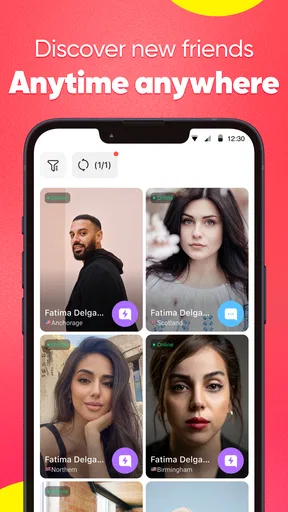
HOLLA - Video Call is a social video-chat app designed for meeting people through live, face-to-face conversations. After creating an account, you can typically browse or connect with available users and start a random video chat. The experience is spontaneous and entertainment-focused, but the people you meet, conversation quality, and available features can vary depending on your location, activity level, and account settings.
Is HOLLA - Video Call free to download and use?
HOLLA can generally be downloaded without an upfront purchase, but some functions may be limited or supported by in-app purchases. Depending on the current version, users may encounter premium credits, subscriptions, or paid options for additional matching and communication features. Before confirming any purchase, check the app’s store listing and payment screen carefully, including renewal terms and cancellation instructions.
Is HOLLA - Video Call safe for teenagers and children?
HOLLA is intended for mature users because random video chat can expose you to strangers and unpredictable conversations. Parents should not assume that age restrictions alone make the service suitable for children. If a minor uses the app despite the restrictions, supervision, privacy guidance, and strict limits on sharing personal information are essential. Never share an address, school, phone number, passwords, or private images.
What privacy and moderation features does HOLLA provide?
The app may provide tools such as reporting, blocking, account controls, and community guidelines to help manage unwanted interactions. However, moderation cannot prevent every inappropriate user or recording attempt in real time. Keep your camera background private, avoid displaying identifying documents or locations, and end the call immediately if anything feels unsafe. Report violations through the available in-app tools.
What should I check before downloading HOLLA - Video Call?
Before installing HOLLA, review the current age rating, supported Android or iOS version, permissions, privacy policy, and recent user feedback in the official app store. A stable internet connection and camera and microphone access are normally required for video calls. Also consider whether you are comfortable meeting strangers on camera, receiving notifications, and potentially encountering paid features or content that varies by region.
